
Dream Road: Online
ARDENT GAMESRacing
4.4383.00 Reviews
- Version
- 1.4.4
- Installs
- 10.00M
- Age Rating
- Everyone
Screenshots
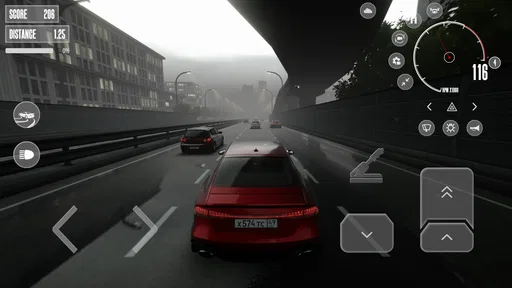
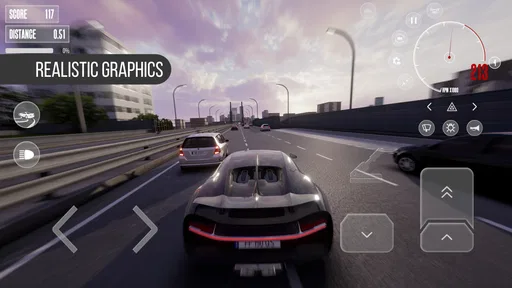

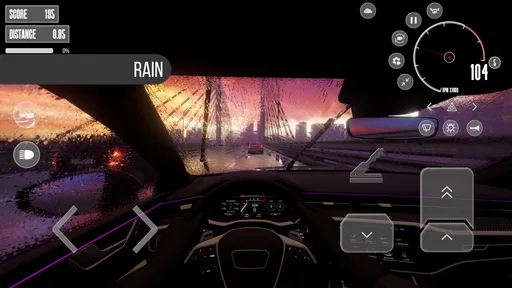
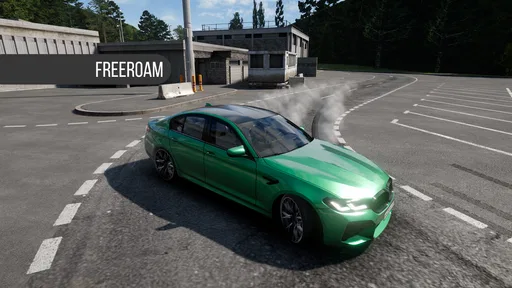


Our Review of Dream Road: Online
 Analysis by Appyee
I spent time with Dream Road: Online as a casual city-racing game, paying particular attention to how it feels when a phone or tablet is shared at home. Its basic appeal is easy to understand: choose a car, adjust it, and head into urban races with other players. That sounds familiar for the genre, but the experience is most interesting when treated as a quick, social driving game rather than a deep simulation.
The game is free to play and comes from ARDENT GAMES. It sits in the racing category, carries an Everyone age rating, and has reached over 10 million installs. Its average score of 4.4 from around 30 thousand ratings suggests that the straightforward formula has connected with a broad audience. I can see why: the controls are approachable, the city setting gives short sessions some energy, and tuning creates a reason to return instead of treating every race as disposable.
How Dream Road: Online Works in a Shared Home
I look at shared play as more than simply passing a phone around: it works best when everyone knows whose profile is active and when a race is finished before the next person takes over. A quick handoff routine can keep tuning choices and progress from becoming a source of friction, while still leaving room for friendly competition. That household perspective also helps clarify what the game’s social setup asks of its players.
A practical game for passing a phone around
The most natural household use case is a quick turn-based session. One person can run a few races, hand over the device, and let someone else try a different car setup. That makes the game more suitable for informal shared play than a racing title that demands a long uninterrupted campaign. If I am waiting for dinner, sitting with family, or taking a short break, I can get something from it without committing an entire evening.
There is also a useful distinction between sharing the device and sharing the game account. Those are not automatically the same thing. A family can pass one phone around, but progress, tuning choices, and any online identity connected to the game should be treated as belonging to the person currently using the account. I would not let several players make changes casually if one person cares about preserving a particular garage or racing profile.
That boundary matters because racing games often turn small adjustments into personal preferences. One player may want a car that feels stable and forgiving, while another may prefer a setup that rewards sharper driving. Without a clear handoff, it is easy for one person to change the vehicle and leave the next player wondering why the car suddenly behaves differently.
Setting expectations before the first race
I recommend agreeing on a simple routine before using it on a shared device: decide who is playing, avoid changing another person’s tuning without asking, and close the session cleanly before passing the phone on. This is not a special feature of the game; it is a practical habit that prevents arguments when several people use the same screen.
The game is available for devices running Android 7.1 or later, which makes it accessible on a range of older Android hardware. That does not guarantee identical performance on every phone, so I would still test it on the actual shared device before promising a smooth group session. Racing is more sensitive to interruptions and touch response than a turn-based puzzle game, and a phone that struggles under load can make a fair comparison between players difficult.
Because the game is free, it is easy to try without making a purchase decision first. Still, “free” should not be confused with “effortless for every household.” Online racing can involve distractions, repeated attempts, and the temptation to keep playing after a short break has ended. I find it works best when the household treats it as a defined activity rather than an always-open background game.
Coordination makes the social side better
The online element changes the mood. A solo race can be a quiet way to learn the streets and understand a car, while racing around the city with friends gives the same controls a more competitive purpose. If several people in the same household want to play, coordinating sessions is more enjoyable than everyone grabbing the device at random.
A useful approach is to give each player a clear goal. One person might focus on learning the route, another might experiment with tuning, and someone else might simply want a few relaxed races. That prevents every session from becoming a contest and gives less experienced players room to improve. I especially like this arrangement for mixed-skill households, because the strongest driver does not have to dominate every round.
For a shared device, I would also keep the handoff short and explicit. Say who is next, check whether the current player has finished the race, and avoid interrupting a match just because another person is impatient. In an online game, leaving at the wrong moment can spoil the experience for more than one player. The practical lesson is simple: coordination is part of the household experience, even when the game itself does not provide a family scheduling system.
What tuning adds to everyday play
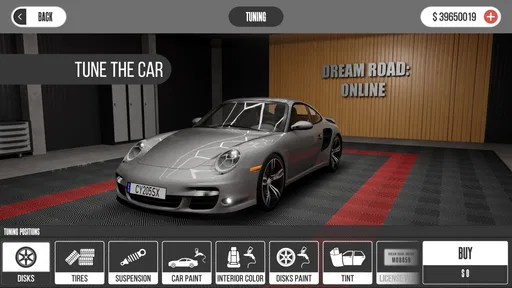
The car adjustment layer is more important than the city setting alone. I found it gives short sessions a sense of continuity: a loss does not always mean I need a completely different game plan, because I can first reconsider the car and how it suits the route. That creates a useful middle ground between a pure arcade racer and a demanding simulation.
My advice is to change one thing at a time. If I alter several aspects of the car before the next race, I cannot tell which change helped or hurt. A better routine is to make a small adjustment, drive the same kind of route, and pay attention to whether the car feels easier to control or merely faster in a straight line. This is a more reliable way to learn than repeatedly rebuilding the vehicle after every defeat.
That method is particularly helpful when several people share the game. Each player can describe what they changed and why, rather than presenting a completely different setup with no explanation. It turns tuning into a conversation and makes the game more approachable for someone who normally skips customization screens.
Age context and trust
The Everyone rating makes the game a plausible choice for a household with younger players, especially when an adult wants a racing game without an age-restricted presentation. Even so, an age label is not a substitute for supervision. The online nature of the title means I would explain basic rules about playing with others, avoiding personal information, and asking before making account or device changes.
Those conversations are more useful than simply handing over the phone. A child may understand how to steer but not why an online match deserves the same courtesy as a face-to-face game. I would also make sure the player knows which profile they are using before starting. On a shared device, confusing one person’s progress with another’s can create unnecessary frustration.
For younger players, I would begin with a short supervised session. Watch how they respond to winning, losing, waiting, and online competition. The game can be a fun introduction to racing, but not every child enjoys the pressure of competing with other people. If the online side causes stress, the better choice may be to keep sessions focused on learning the car and exploring the city rather than chasing results.
For adults sharing the device with children, I would avoid assuming that everyone wants the same level of challenge. A parent may enjoy optimizing a vehicle, while a child may care more about the feeling of driving through the city. Letting each player use the game differently is healthier than forcing every session into a performance test.
Where it fits among racing alternatives
Compared with a realistic driving simulator, Dream Road: Online is easier to approach and less intimidating. I would choose it when I want quick feedback, a city backdrop, and a tuning system that can be explored without treating every corner like a technical exam. Someone looking for authentic vehicle behavior, detailed motorsport rules, or a serious career structure should look elsewhere.
Compared with a purely offline arcade racer, its online identity gives the experience more social energy, but it also makes the session less self-contained. An offline alternative is better for travel, unreliable connections, or a child who should not be interacting with other players. Dream Road: Online makes more sense when the household values competition and shared excitement over complete independence from online play.
It also occupies a different space from a long-form open-world racing game. I would not approach it expecting a huge narrative or a carefully staged campaign. Its strength is the repeatable loop of racing, adjusting the car, and trying again. That focus is convenient for short breaks, although players who need constant new content may find the routine less satisfying over time.
Small frictions that affect the decision
The same simplicity that makes the game approachable can limit it for experienced racing fans. If I want highly detailed control over every aspect of a vehicle, a more specialized simulator will probably be more rewarding. The tuning is valuable because it gives direction to the races, but it should not be mistaken for the depth of a dedicated motorsport management game.
Online play also introduces a dependency that a household should consider. A shared session is only as smooth as the device, connection, and timing allow. If one player is constantly interrupted or another is waiting through an unfinished race, the social benefit disappears. I would keep a clear alternative activity available rather than making the entire family plan depend on one online match.
The free entry point is a genuine advantage for testing the game, but it can also make it easy to install impulsively on a child’s device. I would review the account and device arrangements before handing it over, particularly when several people use the same phone. The important question is not only whether the game runs; it is whether everyone understands whose progress is being changed and how the session should end.
Who should try it, and who should skip it
I think the game is a good fit for players who enjoy short racing sessions, visible car improvement, and friendly competition. It works especially well for a household that shares one Android device and can agree on turns. A newcomer can start with the driving itself, while a more invested player can spend time refining a setup and learning which choices suit a particular route.
I would be more cautious recommending it to someone who wants a fully offline experience, a deep simulation, or a single-player story with a carefully paced progression. It is also not my first choice for a household that cannot agree on account boundaries. In that situation, a separate offline racing game may create less friction, even if it offers fewer social possibilities.
Players who dislike repeating races may also lose interest. The appeal depends on finding satisfaction in small improvements: a cleaner run, a better adjustment, or a more coordinated session with friends. If those incremental goals do not sound enjoyable, the city and online label alone may not be enough to hold attention.
My household verdict
After using it with a shared-device mindset, I see Dream Road: Online as a friendly, accessible racing game rather than a replacement for every other racing style. ARDENT GAMES has built its appeal around a clear loop: drive, tune, and return to the city with a new approach. That loop is easy to explain to another person and flexible enough for both casual and more competitive sessions.
The strongest household advice is to separate access from ownership. Passing the phone around is fine when players know whose profile they are using, what they may change, and when it is someone else’s turn. For younger users, combine the Everyone rating with sensible supervision around online interaction and personal information. Those habits do more to protect the shared experience than any assumption based on the label alone.
The game was released on January 31, 2025, and the current version is 1.4.3. I would keep it updated through the normal device process, then check the controls again after an update before starting a group session. Small interface changes can matter when one person is learning and another is already comfortable.
My final recommendation is positive, with clear limits. Dream Road: Online is at its best as a free, social city racer for short, coordinated sessions. It gives a shared household something to do together without demanding that everyone become a racing expert. Just do not choose it for simulation depth, guaranteed offline independence, or a carefully separated family-account system. If your home can manage those boundaries, it is an enjoyable game to keep ready for the next quick race.
Privacy and Permissions
See what permissions an app requests and how it handles your data.
- Photos/Media/Files
- read the contents of your USB storage, modify or delete the contents of your USB storage
- Storage
- read the contents of your USB storage, modify or delete the contents of your USB storage
- Wi-Fi connection information
- view Wi-Fi connections
- Other
- view network connections, full network access, control vibration, prevent device from sleeping, Google Play license check
Verdict
Strengths of Dream Road: Online
- Large open-world map with plenty of roads to explore
- Smooth driving controls that are easy to learn
- Online multiplayer adds variety and competitive fun
- Wide selection of cars to collect and customize
- Frequent races and challenges help keep gameplay engaging
Limitations of Dream Road: Online
- Some vehicles and upgrades may require significant grinding
- Online matches can be affected by lag or unstable connections
- Traffic and opponents may behave unpredictably at times
- Battery usage can be high during extended play sessions
- Progress may feel repetitive after exploring the main activities
Similar Picks in This Category
View All
Hill Climb Racing
Fingersoft4.3

Dr. Driving
SUD Inc.4.2

Traffic Rider
skgames4.5

Asphalt 8 - Car Racing Game
Gameloft SE4.6

Race Master 3D: Car Racing
Beresnev Games4.6

Extreme Car Driving Simulator
AxesInMotion Racing4.3
Frequently Asked Questions
What is Dream Road: Online?
Dream Road: Online is a multiplayer driving game focused on open-road exploration, vehicle customization, and online interaction. Players can drive through an open environment, improve or personalize their cars, and take part in casual activities with other users. Its appeal comes from combining free driving with social and competitive elements rather than following a strictly linear racing campaign.
Can I play Dream Road: Online without an internet connection?
Dream Road: Online is primarily designed as an online experience, so an active internet connection is generally required for multiplayer features, shared-world activities, account synchronization, and access to certain game content. Some basic menus or previously loaded elements may open offline, but players should not expect the complete gameplay experience without a stable Wi-Fi or mobile data connection.
Does Dream Road: Online support multiplayer gameplay?
Yes, multiplayer interaction is one of the main reasons to play Dream Road: Online. Depending on the available version and server activity, players can encounter other drivers, explore the map together, and participate in driving-related activities. The quality of the experience depends on your connection, device performance, and the number of active players in the region.
Is Dream Road: Online free to download and play?
Dream Road: Online can generally be downloaded without an upfront purchase, allowing users to try its driving and online features at no initial cost. However, free access may include optional purchases, advertisements, or progression systems that can affect convenience and customization. Before downloading, review the store listing for the current pricing model and any available in-app purchase information.
What devices are recommended for Dream Road: Online?
Dream Road: Online may run on a range of compatible Android and iOS devices, but an online open-world driving game can require more processing power than a simple arcade title. A relatively recent phone or tablet with sufficient free storage, updated system software, and a reliable graphics processor is recommended. Older devices may experience longer loading times, reduced visual quality, heating, or frame-rate drops.
Play our best games!


